
At the end of the school year, it is a good practice to graduate or archive your classrooms so your past classroom Announcements and Events will not get in the way of new activities and new classes when the new year starts.
 A confirmation that the class has been unarchived will be displayed at the top!
You can also unarchive classrooms from the Classrooms Menu.
A confirmation that the class has been unarchived will be displayed at the top!
You can also unarchive classrooms from the Classrooms Menu.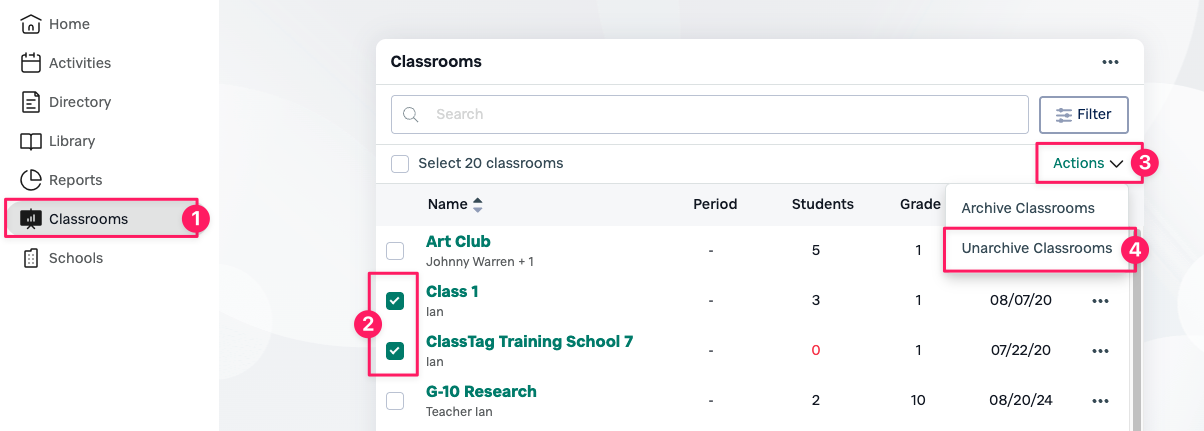 That's it! The class is now accessible again.
Graduating a classroom does not archive teacher, parent/guardian, or student profiles and accounts.
If you need to access or restore a previously graduated/archived classroom, please follow the steps below.
1. Click the drop-down arrow on the top right
2. Click the gear icon
3. Click Schools & Classes

4. Scroll down to Previous Classes, click the 3 black dots of the desired classroom you want to unarchive
5. Click Unarchive this class
1. From your Home-Page, click Classrooms.
2. Check the relevant box to select specific classrooms.
3. Click on the Actions Drop-down
4. Click Unarchive Classrooms